
Students will be using AI this school year, and with learners suggesting that nearly 70% of schools have not integrated AI into their curriculum yet,1 faculty guidance on AI will be highly valued. Most students use ChatGPT, but do they know how to leverage it as an educational guide rather than an answer machine?
ChatGPT launched “Study Mode” in July 2025 and made it available to nearly all users, even users on their free plans.2 Instead of providing direct answers, Study Mode is similar to Khan Academy’s Khanmigo which acts more like a teaching assistant.3, 4 Study Mode leverages Vygotsky’s Zone of Proximal Development (ZPD), supporting students as they stretch just beyond their current abilities, aligning with well-established research on how learning happens best.5
This AI guide on the side can be particularly helpful for complex topics, as students may need to review it a few times before fully grasping the concepts.
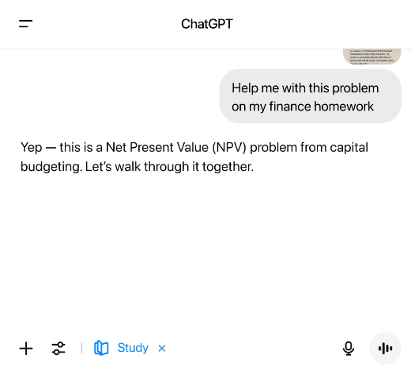
For example, in a graduate business statistics course, if a student recalls one-way Analysis of Variance (ANOVA), but needs help with two-way ANOVA, they can select Study Mode to ask, “How does a two-way ANOVA differ from a one-way ANOVA and when is each used?”
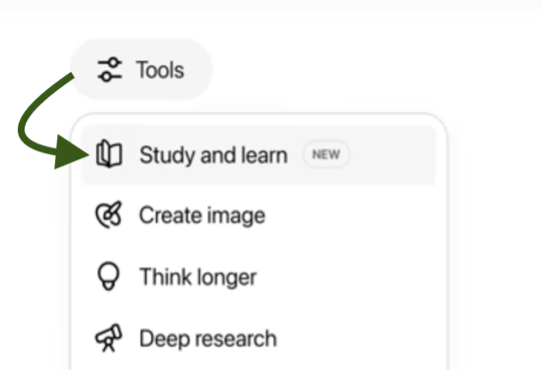
Study Mode replies with a classic tutoring prompt, “What do you already know?” From an instructional design lens, this constructivist approach uses the learner’s prior knowledge to deliver a more personalized and meaningful explanation.
Addressing the use of AI directly with learners is instrumental to increasing a student’s AI literacy and academic success. ChatGPT’s Study Mode is yet another way to turn AI challenges into AI opportunities by clearly laying out your course policy on generative AI usage and demonstrating to students built-in ways to interactively engage with content without having to write clever prompts to get the AI to act like a tutor.7 With very little guidance, Study Mode will inquire about the learner’s current level of readiness on a topic and then help them build on what they already know.
Teach with ChatGPT’s Study Mode
Are you teaching this term? Here are a few practical applications:
Try adaptive self-quizzing.
Ask students to prompt ChatGPT Study Mode to create a set of practice questions with answers so they can check their understanding of the key concepts and if answered correctly, increase the challenge. You can provide this prompt to students, “Quiz me on this topic and make it progressively harder.”
Think you know it? Teach it.
Suggest students test their knowledge by using ChatGPT Study Mode as a pretend study partner and teach the concept. You can give this prompt to students, “Be my study partner while I teach you [this topic].” It’s often said that if you want to test your understanding of a topic, try teaching it. Any instructor can acknowledge the unique combination of deep content knowledge and ability to craft an explanation to any audience needed for such a task.
Syllabus sample language
You are encouraged to use ChatGPT in Study Mode to explore course topics more deeply, generate practice questions, summarize key ideas, and/or clarify concepts, as long as your use follows the academic integrity policy.
When used transparently, Study Mode can support the learning experience and provide learners with an opportunity to achieve course outcomes by fully exploring concepts and addressing areas for academic improvement. Remember that it is important to check your school’s policies related to AI usage and take time to increase your own awareness about how AI is impacting your discipline. Making learning ‘real’ for students in today’s AI world is about building your own awareness about the impact it is having inside and outside the classroom along with the capabilities of new features like Study Mode within widely used tools like ChatGPT.
References
- Risepoint. (2025, June). Voice of the online learner 2025 (14th ed.). Risepoint. https://risepoint.com/wp-content/uploads/2025/06/Voice-of-the-Online-Learner-2025.pdf
- OpenAI. (2025, August 12). Introducing Study Mode in ChatGPT [Video]. YouTube. https://www.youtube.com/watch?v=XDYilxy1dn8
- OpenAI. (2025, August 19). ChatGPT Study Mode – FAQ. OpenAI Help Center. https://help.openai.com/en/articles/11780217-chatgpt-study-mode-faq
- Khan Academy. (n.d.). Meet Khanmigo: Khan Academy’s AIpowered teaching assistant & tutor. Retrieved September 10, 2025, from https://www.khanmigo.ai/ Khanmigo
- Polly, D., Allman, B., Casto, A., & Norwood, J. (2018). Sociocultural perspectives of learning In R. West (Ed.), Foundations of Learning and Instructional Design Technology (1st ed.). Available at https://lidtfoundations.pressbooks.com/
- OpenAI. (2024). ChatGPT Study Mode. [Screenshot]. Retrieved from https://openai.com/index/chatgpt-study-mode
- Risepoint. (2025, January 9). Turning AI challenges into AI opportunities. Faculty eCommons. Retrieved September 10, 2025, from https://faculty.risepoint.com/turning-ai-challenges-into-ai-opportunities/