
Group work can have a negative reputation, especially in online courses, due to a lack of precise, concise, or thorough instructions; unclear grading criteria; confusing or missing participation guidelines; and a multitude of logistical problems (time zones, tech capabilities, material access, etc.). With intentional design and clear planning, group work can account for these challenges and offer students a high-quality and engaging learning experience.
Group work can be very challenging in online courses, but with proper planning it can increase quality student interactions and participation in your course. Use this resource to discover ways to strategically select an assessment for group work and consider learning challenges in your design.
Select an assessment
When selecting an assessment for group work, ask yourself, “What does this activity ask learners to do?” The answer to this question will help you determine whether or not the assessment is a good choice for group work.
The best assessments for engaging groups are open-ended, have no single correct answer, and require a variety of perspectives and viewpoints. To promote higher-level thinking, your group assessment should challenge students to engage in analyzing, evaluating, synthesizing, and/or questioning a problem’s premise or assumptions.
Avoid
Assessments easily accomplished individually
Assessments easily subdivided to individuals without collaboration
Assessments with a singular product or no scaffolding.
Lengthy written assessments
Consider
Debates or research on controversial issues
Analysis of current events
Cultural comparisons
Case studies that seek out creative solutions
Authentic, real-world experiences
Begin design
In order to avoid common group work mistakes, consider these design challenges after selecting an assessment you want to use as a group work experience.
Scaffolding the larger assessment, or breaking up the assessment into a number of smaller tasks, can help your students stay on track and avoid putting off the assessment until the last minute. Multiple checkpoints also allows you to more quickly and strategically intervene if a students are not pulling their weight.
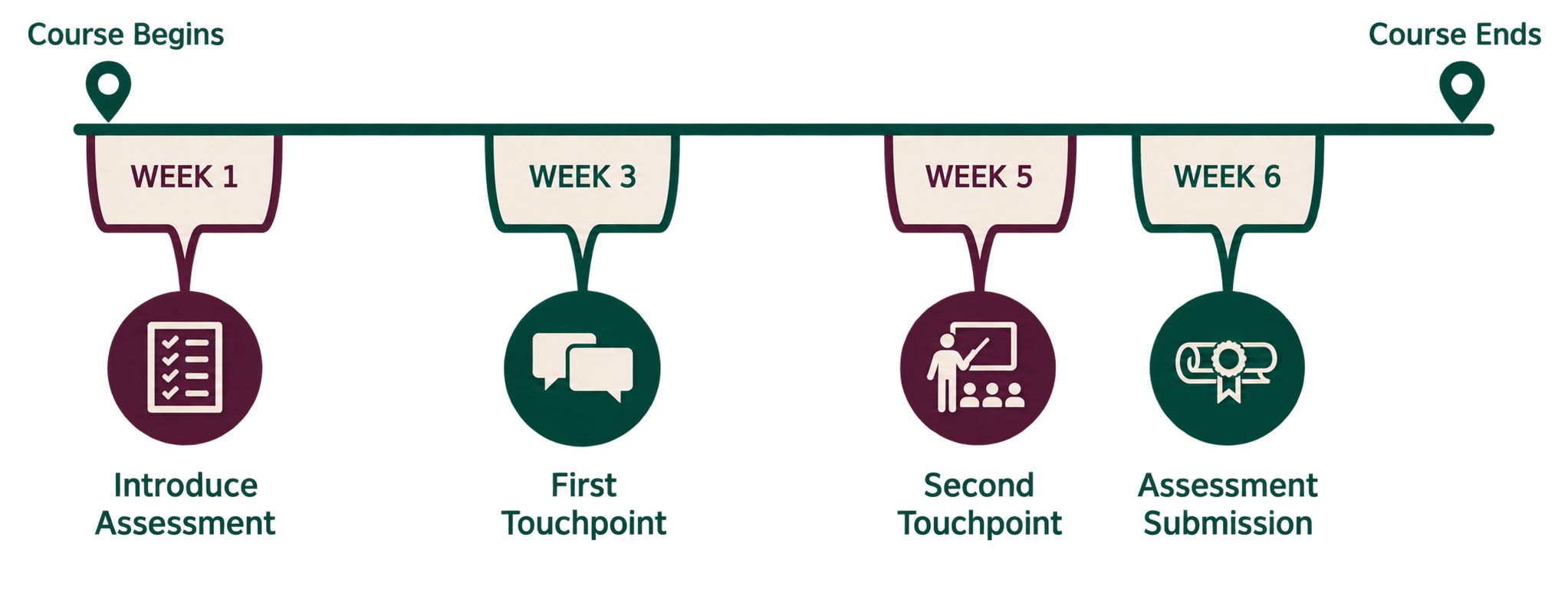
When scaffolding, provide written instructions to your students that list:
- The task (i.e., brainstorming, drafting, presenting, researching)
- The expected product (i.e., presentation, wiki, research collection, calculation)
- The method of “debriefing” or “reporting out” (i.e., sharing results, identifying pros/cons, discussing group ideas, noting consensus and diversity of ideas)
Allowing students to self-select groups can work well in a face-to-face class for short in-class activities, but for longer projects on online classes, where students may not know each other, you might consider using a defined strategy to determine group members:
Random grouping
Groups formed with this strategy are completely up to chance. This technique is best when your focus is on management and forming groups of equal size. This type of grouping is great for assessments meant to help students get to know each other better. This is a great choice for a low-stakes assessment.
Ability grouping
With this strategy, students with similar achievement levels or academic strengths are grouped together. This strategy might work well for small or introductory level courses where your goal is to help students improve together.
Social grouping
Using this strategy, the instructor assigns students a different role within a group. Each role is clearly defined and asks students to practice specific skills. This is a great choice for an authentic assessment that mimics real-world experiences.
Interest grouping
After surveying students or after an introductory assessment, you may be able to assign students to a group based on their interests in a particular topic of study, professional goal, or other similarity. This is a great choice if you are hoping to have students compare and contrast their findings with other groups or debate their results. This may also be a great choice for an introductory course that contains students from many different fields of study.
Task grouping
With this kind of grouping, the completion of the assessment may determine the group members. For example, students who find public speaking enjoyable are grouped together to prepare a presentation while students who prefer research work together to create a proposal. This is a great choice if your assessment provides students a lot of choice in how it is completed.
You can also consider using your students’ attitudes toward group work as a mechanism to help you create groups. Offer a one-question survey determining their comfort level with group work and organize students in groups or pairs based on their attitude.
Depending on the type of assessment a group of students will complete, consider defining and assigning roles throughout a project. Roles can remain consistent throughout a project or change at various scaffolded checkpoints. Clearly defining the roles for students and providing detailed descriptions can help them better understand the part they are meant to play within a group. This can increase accountability and overall participation.

Allowing students to self-select groups can work well in a face-to-face class for short in-class activities, but for longer projects in online classes, you may prefer to provide more structure by assigning roles yourself.
For graduate courses or other higher-level courses, you may also consider asking the groups to define the roles themselves. This can be supported by giving groups a list of potential roles and asking them to decide on and delegate appropriate roles within their group.
Individuals and groups of students may struggle with group work if they are unsure of how feedback will be provided. If the assessment is scaffolded, you have more opportunities to provide students with immediate and unambiguous feedback on their group products and process. Setting aside time for yourself to regularly assess the groups and their progress will help create a higher quality learning experience.
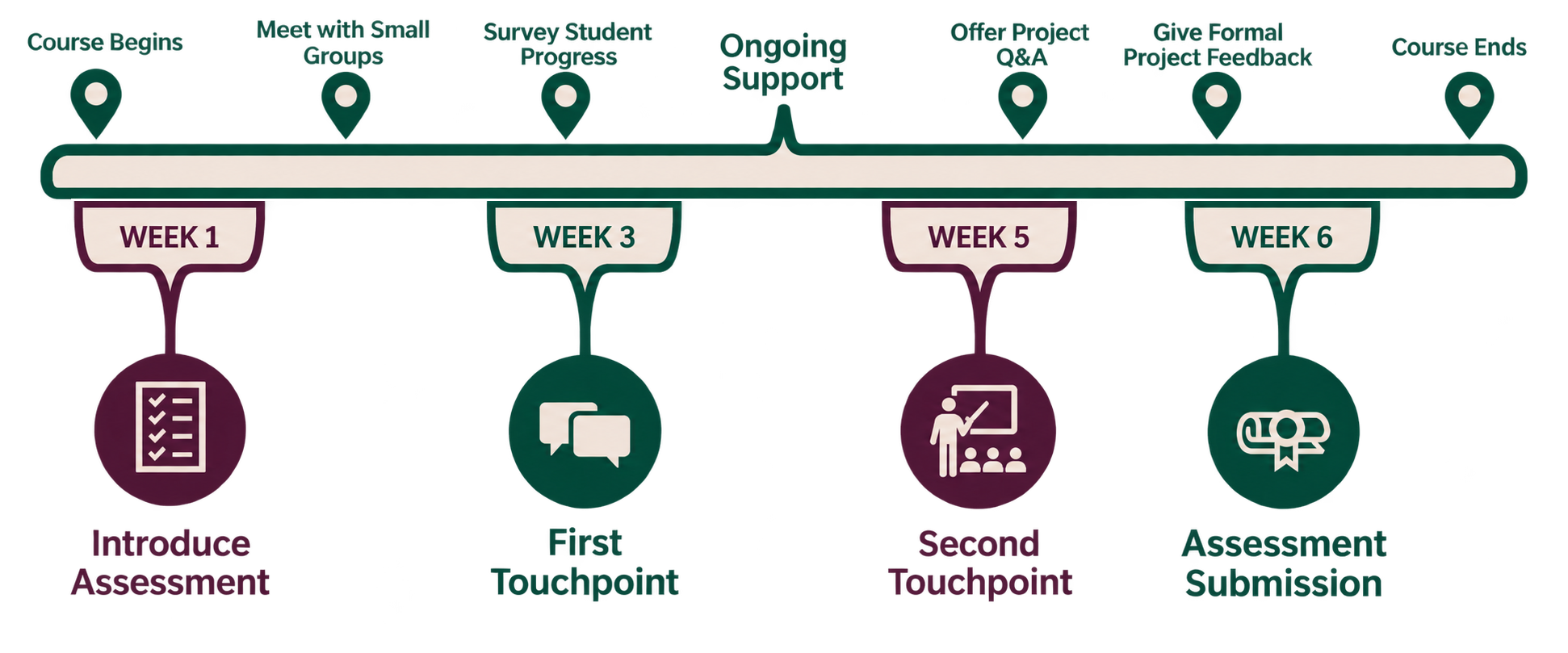
- Throughout the assessment, actively engage and monitor groups. Check for understanding frequently and clarify instructions or confusion. If possible, visit with all groups regularly through a synchronous call, a regular email cadence, a text thread, or during office hours. Groups will need your guidance to facilitate, assist, mediate, intervene, and redirect them as needed. Planning to be present with them throughout the process is key.
- Frequently provide feedback to groups and individuals. Students will want to be assessed individually in order to protect their grade, but they will also want to hear how they can improve as a team member as well. Checking in with students individually and as a larger group can give them the feedback they need to be successful. Plan to check in regularly throughout their touchpoints.
- Allow students to give regular feedback. Ask students to complete surveys or rubrics assessing themselves and each other regularly throughout the duration of the project. Understanding where the pain points are in a group or project can help you identify resources and solutions for students.
References
- Anderson, M. Czerwinski, E. (2019) Learning Verbs List (Abbreviated). Coursetune.
- Barkley, E.F., (2014). Collaborative learning techniques. Chapter 5, Forming Groups.
- Bart, M. (2010). How to Design Effective Online Group Work Activities. Faculty Focus. https://www.facultyfocus.com/
- Brame, C.J. & Biel, R. (2015). Setting up and facilitating group work: Using cooperative learning groups effectively. Vanderbilt University Center for Teaching. http://cft.vanderbilt.edu/guides-sub-pages/setting-up-and-facilitating-group-work-using-cooperative-learning-groups-effectively/.
- Center for Teaching & Scholarly Excellence. (2015). Definitions and Examples of collaborative, cooperative, team-based and problem-based learning. Suffolk University of Boston.
- Bo Chang & Haijun Kang (2016) Challenges facing group work online, Distance Education, 37:1, 73-88, DOI: 10.1080/01587919.2016.1154781
- Eberly Center (2021). Sample Group Project Tools. Carnegie Mellon University – Teaching Excellence & Educational Innovation. https://www.cmu.edu/teaching/designteach/design/instructionalstrategies/groupprojects/tools/index.html
- Hershock, C. and Milkova, S. (2020). Guidelines for Using Groups Effectively. CRLT University of Michigan. https://crlt.umich.edu/gsis/p4_1_5
- National Association of Colleges and Employers (NACE) (2020). Career Readiness Definitions. NACE.
- Shalaway, L. Optiz, M. (2020). Organizing Small Groups: Do You Know All the Options? Scholastic Teaching Resources. https://www.scholastic.com/teachers/articles/teaching-content/organizing-small-groups-do-you-know-all-options/